
Standard Deviation Calculation in Pigment
Using the REMOVE Modifier with STDEVS and STDEVP
Overview
Pigment supports standard deviation calculations directly within metric formulas using the REMOVE modifier. By specifying either the STDEVS or STDEVP aggregator, you can calculate the standard deviation of values across one or more dimensions — without needing a separate calculation block or external tool.
This article covers what standard deviation is, when to use each method, and how to write the correct Pigment formula.
What Is Standard Deviation?
Standard deviation measures how much individual values in a data set vary from the average (mean). A low standard deviation indicates values are clustered closely around the mean; a high standard deviation indicates values are more spread out.
In a planning context, standard deviation is commonly used to:
- Identify volatility in revenue, cost, or demand across regions or products.
- Flag outliers or inconsistencies in performance data.
- Inform confidence intervals and scenario ranges in forecasting.
Pigment provides two methods of calculation, matching the same distinction found in Excel and most statistical tools:
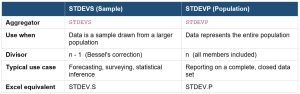
Sample Standard Deviation (STDEVS)
Used when your data represents a sample drawn from a larger population. Divides by n−1 (Bessel’s correction), which adjusts for the fact that a sample tends to underestimate the true variability of the full population. This is the more commonly used method in business planning and forecasting.
Population Standard Deviation (STDEVP)
Used when your data represents the entire population — every member is included and there is no inference being made to a broader group. Divides by n. Use this when reporting on a complete, closed data set where no estimation is required.
The REMOVE Modifier
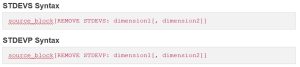
Pigment does not have a dedicated Standard Deviation Function, instead leveraging the REMOVE modifier. The REMOVE modifier excludes one or more dimensions from a Block, applying an aggregation across those removed dimensions. The result retains only the remaining dimensions.
Full syntax:
| source_block[REMOVE aggregator: dimension1[, dimension2]] |
For standard deviation, the aggregator is either STDEVS or STDEVP. The dimensions listed are collapsed and the standard deviation is computed across them.
Calculating Sample Standard Deviation
STDEVS vs. STDEVP: Quick Reference
Removing Multiple Dimensions
Both aggregators support removing more than one dimension in a single formula. The standard deviation is calculated across all value combinations of every removed dimension.
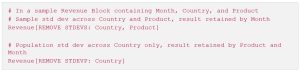
The dimensions that are not listed in the REMOVE clause are preserved in the output. In the first example above, Month is the only remaining dimension; in the second, both Product and Month are retained.
Notes and Limitations
- The source block must be a number or integer formatted Metric or List Property.
- STDEVS and STDEVP are aggregator arguments within the REMOVE modifier — they are not standalone functions.
- Standard deviation aggregators cannot be mixed with other REMOVE aggregators (SUM, AVG, etc.) in a single expression — use separate blocks if both are needed.
- For further detail on all available aggregators, refer to the Pigment documentation: Aggregation Methods.
Related Topics
- REMOVE Modifier — full documentation on removing dimensions with any aggregator.
- ADD Modifier — adding dimensions to a Block.
- FILTER Modifier — filtering dimension members within a formula.
- Aggregation Methods — complete list of aggregators available in Pigment formulas.