
How do I set up NetSuite Journal Entry Approvals: Setup Instructions Explained
Journal entries are fundamental to every accounting department. They ensure financial results are recorded accurately, completely, and on time. In NetSuite, journal entries are used to record financial adjustments across one or more accounts, capturing the fiscal impact of business transactions and enabling accurate measurement and reporting of financial performance.
Implementing a journal entry approval process in NetSuite strengthens internal controls and improves segregation of duties. By requiring multiple individuals to participate in a structured, hierarchical approval workflow, organizations can reduce risk and enhance financial governance.
SETUP
NetSuite provides two methods for enabling journal entry approvals within Accounting Preferences.
1. Approval Routing (Manual Workflow)
Navigation:
Setup > Accounting > Accounting Preferences > Approval Routing subtab
When the Journal Entries box is checked under Approval Routing, a workflow is enabled for manual journal approval routing. This workflow can be configured using either:
- A custom SuiteFlow, or
- A SuiteApproval workflow
Note that journal entry approval workflows do not rely on the Journal Approval permission to determine who can approve entries.
Important Limitation:
If Approval Routing is enabled, only 25 journal entries can be approved at one time.
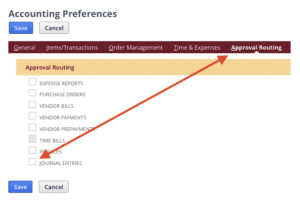
General Preference – Require Approval Before Posting
Navigation:
Setup > Accounting > Accounting Preferences > General subtab
When this preference is enabled, journal entries must be approved before posting to the General Ledger.
Key points:
- A user with Journal Approval (Edit or Full) permission must approve the journal entry before it posts.
- If a user has the required Journal Approval permission, they may approve their own journal entry at the time of entry (unless restricted by workflow rules).
- Journal entry reversals are automatically approved when the original journal entry is approved.
- If the original journal entry is not approved, the reversal cannot be approved.
Permission Requirements
To manage approved journal entries:
- Edit level of Journal Approval permission is required to edit an approved journal.
- Full level of Journal Approval permission is required to delete an approved journal.
Posting Period Considerations
- A journal entry posts to a period the approver has access to.
- Until approval, NetSuite displays the posting period based on the transaction date.
- If the period is locked or closed, the posting period follows the setting in:
Default Posting Period When Transaction Date Is in Closed Periods
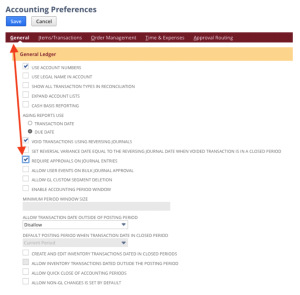
When this preference is checked, journal entry approval is required before posting to your general ledger account. Someone with Journal Approval (Edit or Full) permission must approve a journal entry before the entry is posted to your general ledger. If you have this Journal Approval permission, you can approve your own journal entries when entering them.
Permission Notes:
The following permission levels are required to create, edit, or delete approved journals:
- Users must have the Edit level of the Journal Approval permission to edit an approved journal.
- Users must have the Full level of the Journal Approval permission to delete an approved journal.
- With this preference enabled, journal entry reversals are approved when their corresponding journal entry is approved. A reversal will not be approved if its corresponding journal entry is also not approved.
- A journal entry is posted in a period to which the journal entry approver has access. Until a journal entry is approved, NetSuite displays the posting period based on the transaction date. If this period is locked or closed, the posting period is determined by the accounting preference Default Posting Period When Transaction Date in Closed Periods.
WORKFLOWS
Standardized approval workflows reduce back-and-forth communication and streamline the review process before posting. They also provide automated tracking of:
- Who approved the journal entry
- When it was approved
This creates a clear audit trail and simplifies reporting.
The workflow evaluates both:
- The journal entry’s current status
- The role of the user viewing the record
Based on these factors, the system determines which approval actions are available.
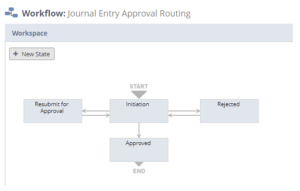
Journal Entry Statuses
Status: Pending Approval
When a journal entry is created and saved, its status is automatically set to Pending Approval.
Users in the following role typically have access to Approve and Reject buttons:
- Accounting Manager
Important Rule:
The same user cannot be both the Creator and the Approver of a journal entry. If a journal entry is created by a user logged in with an approval role, they cannot approve or reject that entry.
Journal Entry Statuses
Status: Pending Approval
When a journal entry is created and saved, its status is automatically set to Pending Approval.
Users in the following role typically have access to Approve and Reject buttons:
- Accounting Manager
Important Rule:
The same user cannot be both the Creator and the Approver of a journal entry. If a journal entry is created by a user logged in with an approval role, they cannot approve or reject that entry.
Status: Approved
A journal entry can only move to Approved status from Pending Approval, following the defined workflow rules.
Once approved:
- The journal entry record is locked for all users except Administrators.
- The Reject button remains available (typically to the Accounting Manager) in case corrections are required.
If rejected at this stage, the journal reverts to Rejected, and the associated rules apply.
Un-Approving a Journal Entry
You can un-approve a journal entry by editing the record and clearing the Approved checkbox.
Important: Do not clear the Approved box if the journal entry is linked to a payment transaction. You must first unapply the payment before removing approval.
Journal entries are the foundational building blocks of financial reporting. Each entry captures critical transaction data, including amounts debited and credited, affected accounts, and transaction timing, before ultimately posting to the General Ledger.
The accuracy of financial statements depends heavily on the integrity of journal entries. Implementing a structured approval workflow in NetSuite strengthens internal controls, enhances transparency, and ensures reliable financial reporting.