
How to Customize Pop-Up Dialogue Boxes in NetSuite
Adding a pop-up dialog box to a SuiteScript client script is a simple and effective way to ensure important messages are seen and acknowledged by end users. Dialogs can be especially useful when you need to alert users during record validation, require them to acknowledge key information on a record, or guide them through a specific process flow. In all of these cases, dialog boxes can be easily embedded into client scripts to enhance the user experience.
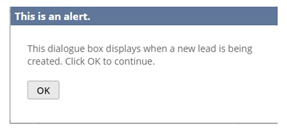
In this basic example, we’ll display an informational alert when a record is loaded in NetSuite. Specifically, the pop-up dialog will appear when a user creates a new Lead record.
To get started, the client script must include a reference to the N/ui/dialog module. This module provides access to the dialog.alert method, which is used to display pop-up messages to the user.
The dialog.alert method accepts an options object with the following customizable parameters:
- title (string, optional): The title displayed at the top of the alert dialog. Defaults to an empty string.
- message (string, optional): The main content of the alert dialog. This can be a static message or a dynamic message built by concatenating variables.
Below is a simple code snippet that can be added to any function within a client script to display a pop-up dialog. In this example, the alert is triggered within the pageInit function, and the script is deployed to run when a Lead record is initialized in NetSuite.
function success(result) {
console.log(‘Success with value: ‘ + result);
}
function failure(reason) {
console.log(‘Failure: ‘ + reason);
}
dialog.alert({
title: ‘This is an alert.’,
message: ‘Click OK to continue.’
}).then(success).catch(failure);
Once the script is deployed, the dialog box will appear whenever a Lead record is opened in create, view, or edit mode.
Stay tuned as we continue exploring more advanced and creative ways to use pop-up dialogs within NetSuite. If you have questions or need assistance, feel free to reach out to a NetSuite consultant.